Retail digital signage gives stores a flexible way to reach shoppers and staff. Promotions run in the window, prices and product details appear in the aisles, and offers play at the checkout, all updated remotely and on a schedule. The TDM Signage team has supported retailers since 2012, from single shops to chains that manage every store from one web browser. This guide explains where to place displays, what to show in each zone, and what a setup costs.
What is retail digital signage?
In simple terms, retail digital signage means displays in and around a store whose content can be updated, scheduled, and managed from a distance. It covers everything from a single screen in a shop window to hundreds of devices across a large network with multiple locations.
Every setup combines three parts that work together. The display shows the content, the media player runs the software and plays the content, and the management software is where content is created, scheduled, and sent to each device. Many commercial displays have the player built in, so they need no extra hardware. A more detailed explanation is available in the guide What is TDM Digital Signage and how does it work.
Where should retail digital signage be placed in a store?
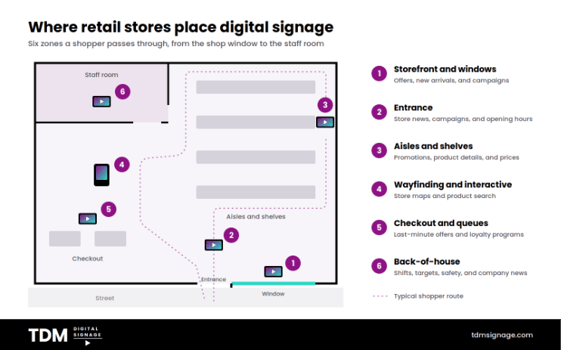
Stores typically use displays in six zones: the storefront, the entrance, aisles and shelves, wayfinding points, checkout areas, and back-of-house. A shopper passes through each of these areas in turn, and each one calls for different content. Looking at the shop one zone at a time is the clearest way to understand how digital signage is used in retail, as the floor plan above shows. The table below summarizes the six zones, the content that suits each one, and the main goal of the displays there.
|
Store zone |
Typical content |
Main goal |
Additional info |
|
Storefront and windows |
Offers, new arrivals, campaigns |
Bring people into the store |
|
|
Entrance |
Store news, campaigns, opening hours |
Welcome and inform |
|
|
Aisles and shelves |
Promotions, product details, prices |
Support buying decisions |
|
|
Wayfinding and interactive |
Store maps, product search |
Help shoppers find things |
|
|
Checkout and queues |
Last-minute offers, loyalty programs |
Increase basket size and shorten perceived waiting time |
|
|
Back-of-house |
Shifts, targets, safety, company news |
Keep staff informed |
Storefront and window displays
Window screens are aimed at people passing by. Their job is to give someone a reason to step inside, usually with a current offer, new arrivals, or a seasonal campaign. Because the content is digital, it can also change with the time of day. A clothing store, for example, might promote new arrivals in the morning and an after-work discount in the evening, without anyone replacing a poster.
Entrance and welcome screens
Just inside the door, entrance displays set the tone for the visit. They typically show the store's main campaign, news, opening hours, or seasonal messages, such as holiday hours. Since shoppers are still getting their bearings at this point, content works best when it is short and welcoming. One clear message is easier to take in while walking than several competing ones.
In-aisle and shelf-edge displays
Closer to the products, signage supports the moment when shoppers make buying decisions. In-aisle and shelf-edge displays show promotions, product details, and prices right next to the items they describe. For retailers with several locations, this is also where central management matters most. When a price or offer changes, it can be updated across all stores at once, instead of being reprinted and replaced shelf by shelf.
Wayfinding and interactive screens
In larger stores, digital signage helps people find their way. Shop directories and maps show where each department is located, which saves shoppers from searching or asking for directions. Some retailers go a step further with touchscreens or kiosks, where shoppers can browse products or find more information on their own.
Checkout and queue areas
The checkout is the last point of contact before a shopper leaves. Displays here often show last-minute offers on small items, information about loyalty programs, or upcoming events. They also give people something to look at while they wait, which can make the line feel shorter. As in every zone, short messages work best, because most people only glance at the screen as the line moves.
Back-of-house and staff communication
Not every screen in a store faces customers. In break rooms and stockrooms, staff displays share shift information, sales targets, safety instructions, and company news. This use is often overlooked, yet it solves a real problem for retail spaces with many employees and changing schedules. Important information reaches the whole team without printed notices or long email chains, and it stays current when plans change.
What does a typical setup look like for different stores?
The number of screens a store needs depends mainly on its size and on whether it is part of a chain. The table below shows three common examples of digital signage for retail.
|
Store type |
Typical zones |
How it is managed |
|
Small shop or boutique |
Window and checkout, 1–2 screens |
One person updates content, often with templates |
|
Supermarket or large store |
Entrance, aisles, checkout, wayfinding, and staff room |
Content scheduled by time of day, with live prices and offers where available |
|
Retail chain or franchise |
The same zones in every store |
Central team manages campaigns, while each store adds local content |
For chains and franchises, the main challenge is usually not the hardware itself but managing it. A central team needs to control campaigns across all locations, while each store still has room for its own content. The software section below explains what to look for to make this work.
What does a store need to get started with digital signage?
Getting started requires three building blocks:
- Displays. Commercial displays are built for long daily use. Consumer TVs, by contrast, are not designed for continuous signage use, and their compatibility with software is not guaranteed.
- A media player. Some commercial displays have a player built in, so the software runs directly on the display. Others need an external player, such as the TDM Player, usually connected through HDMI.
- Digital signage software. This is where content is created, scheduled, and sent to each display. With a platform like TDM, store staff can update content without design or IT help.
On top of these, each device needs a network connection, so it can receive new content and schedule changes.
How much does retail digital signage cost?
What a store pays for digital signage depends on how many screens it uses, which hardware it chooses, and how the software is licensed. In practice, the main cost factors are:
- Displays, either new commercial models or compatible ones a store already owns.
- Media players, needed only when a display has no built-in player.
- A software license, usually charged per screen.
- Installation, including mounting and cabling.
Because software is usually licensed per screen, costs grow with the size of the network.
How to choose digital signage software for a store
Software is the part of the setup that store staff use every time content changes, so it decides how easy daily work will be. Before choosing a platform, it helps to check the points below and ask each vendor the same questions.
|
What to check |
Why it matters in retail |
Question to ask the vendor |
|
Hardware compatibility |
Many stores already own screens |
Which display brands and operating systems are supported? |
|
Ease of use |
Store staff, not IT teams, update content |
Can someone without design skills create and publish content? |
|
Multi-store management |
Chains need central control with local flexibility |
Can screens be grouped per store, with local access rights? |
|
Scheduling |
Offers change by hour, day, and season |
Can content run on automatic schedules? |
|
Integrations |
Live data keeps screens current without manual work |
Which data sources are supported? |
|
Offline playback |
Store connections are not always stable |
Does content keep playing if the connection drops? |
|
Access control |
Many users, but few should change everything |
Are there user roles and per-screen rights? |
|
Pricing model |
Costs grow with the number of screens |
Is pricing per screen, and what is included? |
How TDM Signage supports retail stores
TDM Signage is built for the way retail teams work: content changes often, and the people who update it are rarely IT specialists. Because the platform runs in a web browser, store teams can manage their own displays from day one, whether they run one shop or a full chain. Here is how it answers each point on the checklist above:
- Works with existing displays. TDM runs on Samsung Tizen, LG webOS, Windows, and Android, and other screens connect through the TDM Player.
- Easy for store staff. A drag-and-drop editor and more than 200 templates let staff publish new offers without a designer or IT help.
- Built for multiple stores. Each retail space’s displays form a player group, so chain-wide campaigns and local content run side by side.
- Automatic scheduling. Morning offers and evening promotions switch on their own, and power schedules can put supported displays into standby after closing.
- Live content included. Social media, weather, and news feeds keep displays current without manual updates.
- Reliable playback. Players store content locally, so displays keep running if the connection drops for a short time.
- Clear access rights. Store managers can be limited to their own displays, while a central admin keeps oversight of every location.
- Simple pricing. Plans start at €14 per screen per month, and support is free.
On top of that, the cloud platform is hosted in the Netherlands and built in line with GDPR principles. The easiest way to see how this works in a store is the 30-day free trial, which requires no credit card. More details are available on the page about TDM's retail digital signage software.