
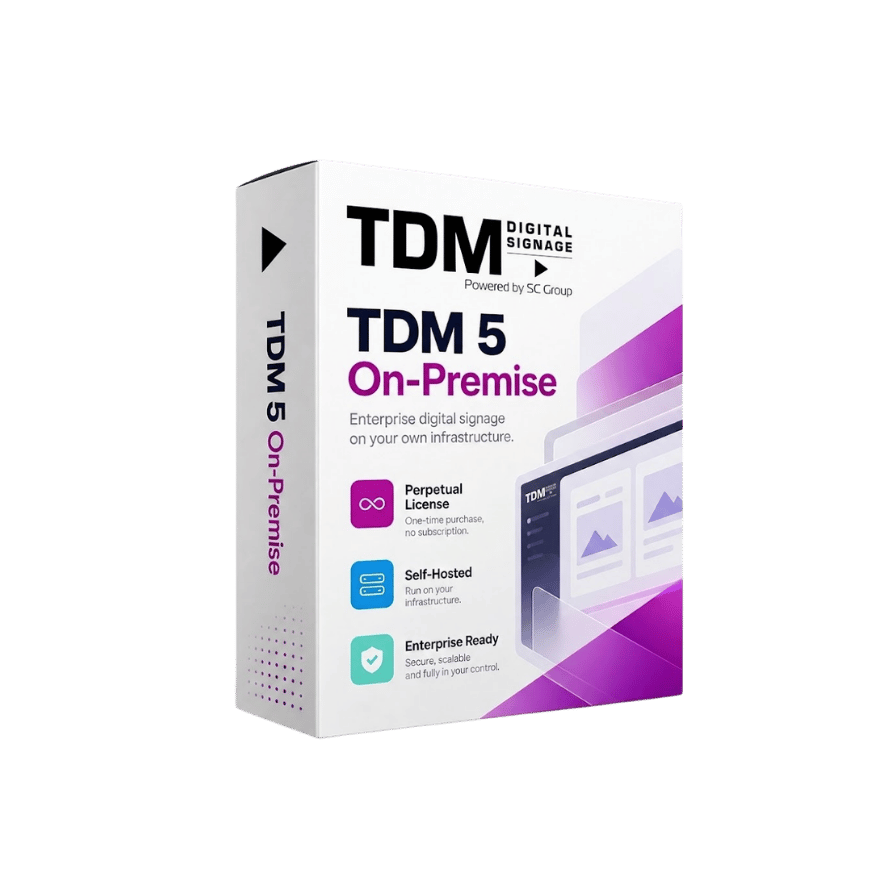





On-premise digital signage software for secure networks

Run TDM Signage on your own server. Your content, users, and screen data stay inside your network, and your teams keep the same easy content management.

30-day free trial. No credit card required.

tdm signage license on premise

Trusted by leading organizations worldwide

VD-Valk-logo-1
dhl international logo
logo-stedin-groep
honda logo
Saxion Hoogeschool logo
ggd drenthe logo

What is on-premise digital signage software?

On-premise digital signage software is installed on a server that your organization owns and manages. It is not hosted by the software provider. Your content, user accounts, and screen data stay on your own infrastructure.

TDM On-Premise is the self-hosted version of the software. It runs on a Windows server inside your network, while your teams create, schedule, and publish content just like they would in the cloud. Only the hosting changes. The way you work stays the same.

It is a practical choice for organizations with strict IT, security, or data policies, and for those that prefer to keep their digital signage fully in-house.
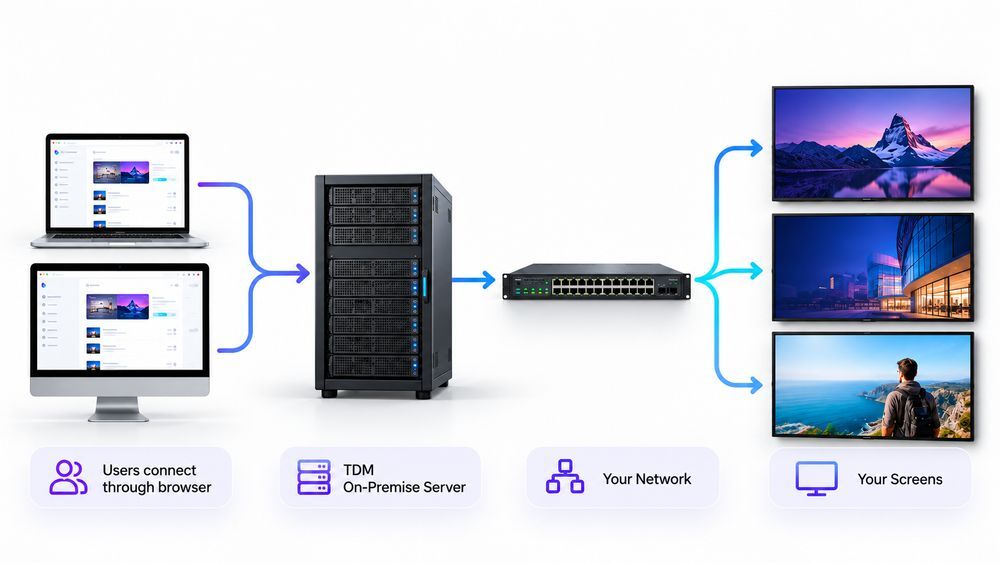
on premise digital signage setup diagram

Why run digital signage on your own server

TDM On-Premise gives your IT team full control over the environment. Your content teams keep the simple workflow they need.

Centralized control across locations

Keep your data inside your network

Content, media files, user accounts, and screen information are stored on your own server. Your data stays in your environment unless you choose to connect external data sources.

Flexible screen compatibility

Work within your existing security policies

TDM runs on your infrastructure, so your IT team applies its own firewall rules, access policies, backups, and monitoring. Role-based access lets you decide exactly who can view, create, publish, or manage screens.

Screen management

Own your software licenses

TDM On-Premise uses perpetual licenses. You buy a license per screen once. An annual maintenance license covers support and updates. This model suits organizations that prefer a one-time software investment over a monthly subscription.

Consistent guest communication

Easy for content teams from day one

On-premise does not mean complicated. Your teams use the same browser-based TDM editor, templates, and scheduling tools as cloud users. Daily content updates don’t require IT support.

See how TDM Signage fits your network

Book a demo with our team. We’ll walk you through the platform and answer your technical questions.

30-day free trial. No credit card required.

The same TDM Signage, on your infrastructure

The software includes the content management tools your teams use every day. Only the hosting location changes.

Visual content editor

Design screen content in your browser with drag-and-drop tools.

200+ templates

Start from ready-made layouts instead of a blank page.

Playlists

Group content in a set order and update every assigned screen at once.

Scheduling

Plan content by time of day, day of week, or season.

Role-based access

Assign Admin, Player Manager, Content Manager, or Content Editor roles.

Multi-location management

Manage screens across buildings and sites from one dashboard.

Broad device support

Connect screens running Samsung Tizen, LG webOS, Windows, or Android, or use a TDM Player.

Cloud vs. on-premise digital signage: what’s the difference?

Both versions of TDM Signage give you the same content management experience. The right choice depends on your IT requirements and how you prefer to buy software.

Feature On-Premise Cloud
Where it runs Runs in EU-based data centers in the Netherlands.
Data location Stores data in TDM’s EU hosting environment.
Server management Fully managed by TDM.
Licensing Uses a subscription per screen.
Updates Updates are applied automatically.
Getting started Self-service, with your first screen live in minutes.
Free trial Offers a 30-day free trial.

When to choose on-premise digital signage

TDM On-Premise is built for organizations where control over software and data is a requirement, not a preference.

internal infrastructure logo

Your IT policy doesn’t allow external cloud software

Keep digital signage within the approved boundaries of your internal infrastructure.

public sector logo

You work in a regulated or public sector

Government, healthcare, finance, and utilities often have strict rules about where data is stored and processed.

network logo

Your screens run on segmented networks

Run TDM on a server within the same secured network as your screens and users.

product logo

You prefer owning your licenses

Buy perpetual licenses instead of paying a monthly subscription per screen.

security logo

You deliver signage to security-sensitive clients

AV integrators can offer clients a fully self-hosted option with the same TDM platform. Learn how to become our partner.

How TDM On-Premise deployment works

Our team guides you through every step, from server planning to your first published screen.

1

Plan your setup

We review your number of screens, network, and server environment with your IT team. This makes sure everything is ready before installation.

2

Installation and activation

Our specialists install and configure TDM Signage on your Windows server and activate your screen licenses. Your IT team stays informed throughout the process.

3

Connect screens and start publishing

Register your screens, invite your users, and start creating content. From here, daily use works the same as in the cloud.

Server requirements for on-premise installations

TDM's on-premise version runs on Windows Server. Choose your server specification based on the number of screens you plan to manage.

Minimum (up to 50 screens)

  • CPU: 4 vCPU
  • RAM: 8 GB
  • Storage: 100 GB SSD
  • Operating system: Windows Server 2022 or 2026

Recommended (up to 500 screens)

  • CPU: 8 vCPU
  • RAM: 16 GB
  • Storage: 250 GB SSD, more if you use a lot of large media files
  • Operating system: Windows Server 2022 or 2026

Planning more than 500 screens?

Our team will advise on the right server setup for your deployment.

Licensing, support, and updates

The software uses a clear licensing model, so you know exactly what you are paying for.

For example, 10 screens need 10 perpetual licenses and 10 annual maintenance licenses.

infinity logo

Perpetual screen license

A one-time license for each screen that runs TDM Signage.
maintenance logo

Annual maintenance license

A yearly license per screen that covers support and software updates.
support logo

Support from the TDM team

Support is included with your maintenance license. Our team helps with setup, content, scheduling, and screen management questions.

Frequently asked questions

On-premise digital signage means the software runs on a server your organization owns and manages, not on the provider’s cloud. Your content, users, and screen data stay inside your own network.

Both versions offer the same content management experience. The cloud is hosted and managed by TDM in EU data centers. On-premise runs on your own Windows server and is managed by your IT team.

For up to 50 screens, you need at least 4 vCPU, 8 GB RAM, and a 100 GB SSD. For up to 500 screens, we recommend 8 vCPU, 16 GB RAM, and a 250 GB SSD. Both setups run on Windows Server 2022 or 2026.

The TDM team installs and configures the software on your server. We work with your IT team to plan the setup before installation.

You buy a perpetual license for each screen, plus an annual maintenance license per screen. The maintenance license covers support and updates.

Support is included if you purchase an annual maintenance license per screen. 

Most TDM integrations are available on-premise. Our team confirms which integrations apply to your setup during planning.

Yes. Our team can plan and support your migration from the cloud version to your own server.

You can book a demo to see TDM On-Premise with our team. You can also explore the TDM interface with the 30-day free cloud trial.

Keep your digital signage inside your network

Talk to our team about TDM On-Premise. We’ll review your requirements and help you plan the right setup.

30-day free trial. No credit card required.